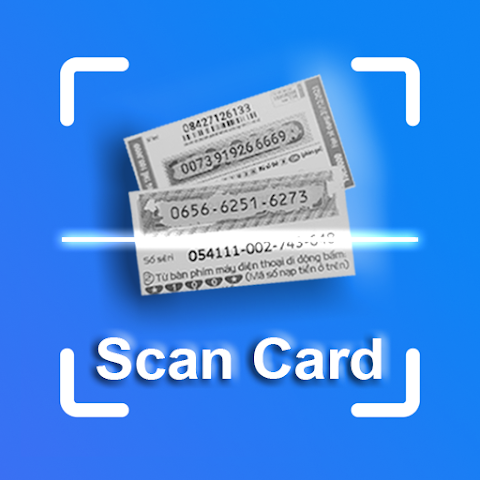
Remember the last time you bought a prepaid recharge card for your phone or a gift card for a friend? You're left with a flimsy piece of plastic or paper, you scratch off the coating with a coin, and then you carefully—painstakingly—type that long, jumbled code into your phone. One wrong digit, and you have to start over. It's a small but persistent annoyance. Now, imagine pointing your phone's camera at that code and letting technology do the rest. That's the simple, brilliant promise of apps like BBScan - Recharge Card Scanner.
The Problem with the Old Way
For millions of people around the world, physical prepaid cards are still a daily reality. They're used for mobile phone credit, gaming subscriptions, streaming services, and store gift cards. The ritual of scratching and typing is so common that we rarely question it. But let's be honest: it's far from perfect. The coating can be difficult to remove, the numbers can be tiny or poorly printed, and entering a 16-digit code on a cramped smartphone keyboard is a recipe for typos. It’s a moment of friction in an otherwise seamless digital experience.
What Is a Recharge Card Scanner and How Does It Work?
A recharge card scanner app transforms your smartphone's camera into a high-speed data entry tool. Instead of your eyes and fingers doing all the work, the app uses Optical Character Recognition (OCR) technology. You simply launch the app, hold your camera over the printed code on the card, and it instantly reads the numbers and letters. The app captures the code, saves it, and often presents it to you in a clean, easy-to-read format. You can then copy it directly into the recharge menu of your phone or any other app, bypassing the manual typing altogether.
More Than Just Scanning: A Handy Digital Wallet for Codes
While instant scanning is the headliner, apps like BBScan often offer a suite of additional features that turn them into a comprehensive code management tool. They don't just read the code; they help you keep track of it.
- Photo Gallery Scanning: Found an old gift card or a photo of a code you saved weeks ago? You don't need the physical card. You can scan the code directly from an image in your phone's gallery.
- Code History & Organization: The app automatically saves every code you scan, creating a searchable history. This is incredibly useful for keeping track of multiple cards or ensuring you don't lose a code before you have a chance to use it.
- Export to Excel: This is a surprisingly powerful feature for power users. You can export your entire list of scanned codes into an Excel file. This is perfect for small business owners tracking gift card sales, or for anyone who wants a backup list on their computer.
- Universal Compatibility: The best apps in this category are designed to read codes from virtually any provider—mobile operators, game platforms, streaming services, and more.
Who Benefits Most from This Technology?
While almost anyone who uses prepaid cards will find a scanner app useful, certain groups will wonder how they ever lived without it.
- Frequent Travelers: If you buy local SIM cards or top-up vouchers when traveling, this app eliminates the frustration of typing in unfamiliar number formats.
- Parents and Gift-Givers: Keep track of all the gift cards you receive for birthdays and holidays in one organized list. No more forgetting you have a $50 coffee shop card lurking in a drawer.
- Small Business Owners: If you sell products or services that use scratch cards, this app can help you quickly verify and log activated codes for your records.
- Gamers: For those who regularly purchase game time or in-game currency via cards, a scanner app means more time playing and less time typing.
A Closer Look at User Experience and Data Privacy
A quick glance at the BBScan app page reveals a developer focused on practical improvements. The latest update highlights support for exporting to Excel files, along with bug fixes and performance enhancements. This shows a commitment to evolving the tool based on user needs.
When it comes to data, the app presents an interesting profile. It states it does not collect any data, which is excellent for privacy. However, it also notes it may share certain data types like photos, files, and device IDs with third parties. This is a common nuance; the sharing might be related to necessary functions (like accessing your photo gallery for the scan feature) or for serving ads in a free version. As always, it's wise to review the permissions and privacy policy before installing.
The Future of Physical Codes in a Digital World
One might wonder, in an age of digital delivery, if physical cards are becoming obsolete. The answer is no—they're simply evolving. Many people still prefer giving a physical card as a tangible gift. Scratch cards are also crucial in regions with less developed digital payment infrastructure. Apps like BBScan act as a vital bridge, connecting the physical tradition of card-giving with the digital convenience we expect today. They acknowledge the ongoing relevance of these cards while removing the tedious part of the process.
How to Choose the Right Scanner App
If you're convinced it's time to ditch the manual typing, here’s what to look for in a good recharge card scanner app:
- Scanning Accuracy: Look for apps that advertise high recognition accuracy and support for various code formats.
- Key Features: Decide if you need extras like gallery scanning, Excel export, or cloud backup of your code history.
- User Interface: The app should be intuitive. You want to scan a code in seconds, not navigate a complicated menu.
- Privacy Policy: Check how the app handles your data. Does it need to collect information that doesn't seem necessary for its function?
- Recent Reviews: Scan the latest user feedback on the app store to see if recent updates have introduced any bugs or if users are generally satisfied.
Conclusion: Embrace the Scan
It's the little frustrations in life that, when solved, bring an unexpected sense of relief. A recharge card scanner app is a perfect example of a niche tool that delivers genuine, everyday convenience. It takes a task that is finicky and error-prone and makes it instant and effortless. By downloading an app like BBScan, you're not just getting a code reader; you're streamlining a small but recurring chore. You're freeing up mental energy and ensuring that every cent on every card you own is used exactly as intended—without the headache. Give it a try, and see how satisfying it is to let your camera do the typing.